
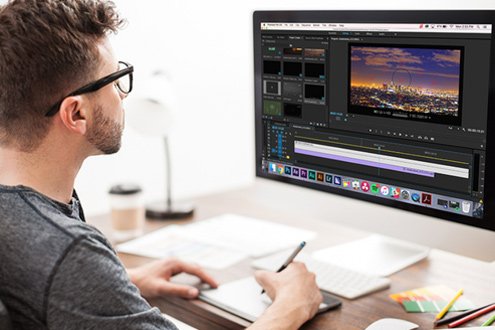
Video Editing is the process of manipulating and arranging video footage to create a polished and cohesive final product. It involves Cutting, Trimming, adding Effects, Music, Transitions, and Titles.
Who Needs Video Editing Training?
- Aspiring YouTubers and Content Creators
- Social Media Influencers and Managers
- Filmmakers and Videographers
- Marketing and Advertising Professionals
- Journalists and News Editors
- Teachers and Online Educators
- Corporate Communication Teams
- Wedding and Event Videographers
- Freelancers and Media Professionals
- New Video Editors
- Students Interested in Media & Communication
- Individuals interested in Certification
Programs Covered in Video Editing Session








Key Topics Covered in Video Editing Training?
- Basics of video formats, frame rates, and resolutions
- Importing, organizing, and managing media files
- Cutting, trimming, and arranging video clips
- Adding transitions, titles, and text overlays
- Color correction and color grading techniques
- Audio editing, mixing, and synchronization
- Using visual effects and motion graphics
- Working with green screen (chroma key)
- Exporting videos in various formats and quality settings
- Project workflows and best editing practices
Frequently Asked Questions (FAQ’s)
Get answers to most common questions People also ask about Video Editing
What is Video Editing?
Video Editing is the process of manipulating and arranging video footage to create a polished and cohesive final product. It involves Cutting, Trimming, adding Effects, Music, Transitions, and Titles.
What does Video Editing Trainer do?
A Video Editing Trainer is a skilled professional who teaches individuals how to edit videos using industry-standard tools and techniques. They guide students through the fundamentals and advanced aspects of editing – from cutting clips to adding effects, audio, transitions, and exporting polished videos.
Why Video Editing Training is Important?
Video Editing Training is Important as it:
- Enhances storytelling and visual communication skills
- Improves content quality for professional impact
- Increases job opportunities in media and digital industries
- Enables creation of engaging social media and marketing content
- Boosts productivity with efficient editing workflows
- Teaches use of professional editing tools and software
- Helps build a strong personal or brand identity through video
- Prepares for freelance or remote video editing careers
- Equips learners with technical and creative skills
- Provides a competitive edge in the growing digital content market
Who Can Join a Video Editing Training?
Anyone with an interest in video editing – students, content creators, professionals, or hobbyists – can join. No prior experience is usually required.
Is the Video Editing Training Suitable for Complete Beginners?
Yes, many programs start from scratch and gradually move to advanced topics, making them ideal for beginners.
How Video Editing Training is Conducted?
- Live online classes with expert instructors
- Self-paced video tutorials and recorded sessions
- Hands-on practice with real-world projects
- Step-by-step software demonstrations
- Assignments and editing exercises
- Interactive doubt-clearing sessions
- Workshops on industry tools like Premiere Pro or Filmora
- Peer reviews and group feedback sessions
- Portfolio development and project submission
- Certification and career guidance support
Do I Need a High-End Computer for Training?
A basic computer can handle beginner-level editing. However, for advanced editing, a system with a good processor, RAM (16GB+), and a dedicated graphics card is recommended.
Which Software will I Learn in the Training?
Most Video Editing Course cover popular tools like Filmore, Adobe Premiere Pro, Final Cut Pro, DaVinci Resolve, and After Effects, depending on the training provider.
How long does the Training Program last?
Training duration varies. It can range from a few days (crash Training) to several weeks or months (professional-level training).
Can I take the Training online?
Yes, both online and offline video editing training with live or recorded sessions are available.
What Will I be Able to Do after Completing the Training?
You’ll be able to edit professional-quality videos, use editing software confidently, and create content for social media, YouTube, businesses, or clients. You can offer other Video Editing Services also.
Will I Get a Certificate after Completing the Training?
Yes, we provide a certificate upon successful completion, which you can use to build your resume or freelance profile.
I Have More Questions to Ask?
Yes, You can Book an Appointment directly via our Website Contact Form, WhatsApp, Phone, or Email. Our Support Team will be happy to resolve your queries.
We are Certified
Video Editing Trainer
Certified from the renowned institutions such as Conselle Institute of Image Management (CONSELLE) – USA, City & Guilds (London – UK), National Accreditation Board for Education and Training (NABET) – India, and Softpro Advance Diploma in Digital Marketing (India).



We conduct Video Editing Training across globe
Unlock your creative potential and master the art of Video Editing with expert-led training. Whether you’re a beginner or looking to level up, our Video Editing Training will guide you from Basics to Pro-Level Skills with Hands-on Projects, Real-World Tools, and Personalized Support.
Don’t wait for the perfect moment. Click Here and Book an Appointment and turn your passion for Video into a powerful career!
Other Popular Training & Consultation Programs